Books
Another possibility for displaying my work as a portfolio, is in a book. Silverprint also sell books which have four screws in the binding, this allows you to add more and more prints as you go.These look really nice, but are a lot more money than boxes.
I've also looked at making a book myself instead of buying one, a website that helps with this is Self Publish Be Happy.
Which is a site that promotes creating and publishing a book yourself. I would like to do this, but I don't feel that my work for narratives is suitable enough to go into a book. Therefore I think my final decision is to buy a portfolio box.
Sunday, 3 March 2013
Folio research
Print boxes & Portfolio boxes
The next section of research I have done, is on portfolio presentation options. Namely; print boxes and portfolio boxes. Our tutors suggested print boxes, which is the first area I have investigated.
The website I have looked at to begin my research is Silverprint. It is a well known company that supplies many items for photographers to display and store their work in. The above boxes vary in size and price, the smallest being 5 x 7" for £6.79, and the largest being A2 for £23.29. These boxes don't come in the size I'm thinking of which is 10 x 12", and I want to use this because it is the size of the paper I own and the original size of the prints for my narrative project.
Another option for displaying my portfolio, is a portfolio box. This is much thicker than a print box, and also quite more expensive. But these boxes are likely to last a long time, so will be very worth the price. They do have my preferred size in this box too, so I'm looking to buy one of these I think.
As well as the box, I need sleeves to keep my prints safe while they're inside it. Polyester sleeves are my best bet, and Silverprint sell them at the right size for my box.
The next section of research I have done, is on portfolio presentation options. Namely; print boxes and portfolio boxes. Our tutors suggested print boxes, which is the first area I have investigated.
The website I have looked at to begin my research is Silverprint. It is a well known company that supplies many items for photographers to display and store their work in. The above boxes vary in size and price, the smallest being 5 x 7" for £6.79, and the largest being A2 for £23.29. These boxes don't come in the size I'm thinking of which is 10 x 12", and I want to use this because it is the size of the paper I own and the original size of the prints for my narrative project.
Another option for displaying my portfolio, is a portfolio box. This is much thicker than a print box, and also quite more expensive. But these boxes are likely to last a long time, so will be very worth the price. They do have my preferred size in this box too, so I'm looking to buy one of these I think.
As well as the box, I need sleeves to keep my prints safe while they're inside it. Polyester sleeves are my best bet, and Silverprint sell them at the right size for my box.
Tuesday, 26 February 2013
Website builders: Wix
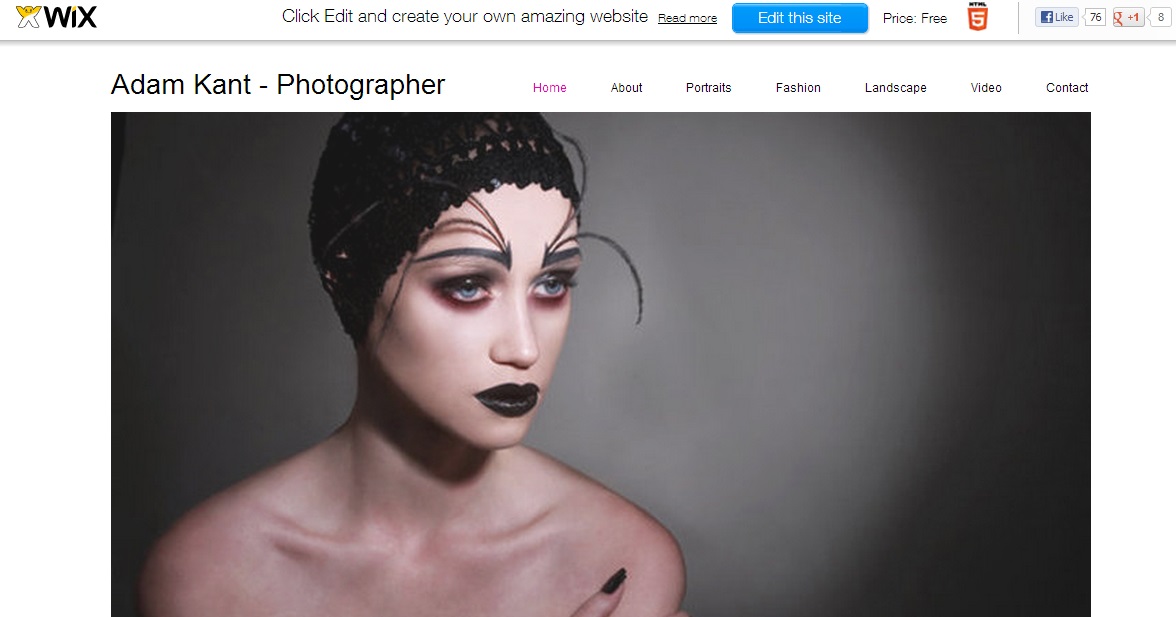
Wix is the third website builder I looked at, and straight away I'm impressed with it. The home page immediately shows template, each for different types of websites such as beauty care websites and interior decorating websites.
It is possible to then click on these and view them bigger, as well as actually edit them myself. You have to create an account to do so though. This template is specifically for photography, and includes a clear navigation bar at the top, as well as a large space in the middle for an image. I quite like the look of it and might use Wix for my final website.
It has a large amount of features very similar to those of Weebly and Moonfruit. However, one thing it had that is unique is the ability to hire a professional to design your site for you. This could be very helpful for someone who is busy and doesn't have time to make it themselves, or someone who doesn't know how to make a website. Although, I don't know how, but I wouldn't hire a professional. I'd prefer to learn how to do it myself.
It is possible to then click on these and view them bigger, as well as actually edit them myself. You have to create an account to do so though. This template is specifically for photography, and includes a clear navigation bar at the top, as well as a large space in the middle for an image. I quite like the look of it and might use Wix for my final website.
It has a large amount of features very similar to those of Weebly and Moonfruit. However, one thing it had that is unique is the ability to hire a professional to design your site for you. This could be very helpful for someone who is busy and doesn't have time to make it themselves, or someone who doesn't know how to make a website. Although, I don't know how, but I wouldn't hire a professional. I'd prefer to learn how to do it myself.
Monday, 25 February 2013
Website builders: Weebly
I had a look at Weebly next, as I've seen a few fellow students on my course with sites using it.
Straight away I have a problem, it terms of how it is linked to facebook. I don't like that at all, it makes me think it's not going to be very professional. However, on a good note, it has a video to show you how to create your own website. This is the first website builder I've found with a help video.
Above is the first themes/templates that Weebly shows, and my first impressions aren't exactly good. They all look a bit tacky and unimpressive, and don't seem to work well for showing images. Although they do have clear text and clear navigation buttons.
Above is the list of features Weebly has, and these are all included in the free package. This is far more impressive than the preview of templates, showing a wide range of helpful features. I still can't decide which website builder to use, but if I chose Weebly I will make sure it isn't connected to my facebook.
Straight away I have a problem, it terms of how it is linked to facebook. I don't like that at all, it makes me think it's not going to be very professional. However, on a good note, it has a video to show you how to create your own website. This is the first website builder I've found with a help video.
Above is the first themes/templates that Weebly shows, and my first impressions aren't exactly good. They all look a bit tacky and unimpressive, and don't seem to work well for showing images. Although they do have clear text and clear navigation buttons.
Above is the list of features Weebly has, and these are all included in the free package. This is far more impressive than the preview of templates, showing a wide range of helpful features. I still can't decide which website builder to use, but if I chose Weebly I will make sure it isn't connected to my facebook.
Website builders: Moonfruit
Now I've analysed some live websites, I know what makes them good and bad. So I'm going to look at some website builders and compare what they offer and how their templates suit my needs. The first website builder I have found is Moonfruit:
It offers a large amount of templates to chose from, all of which suit different types of websites depending on what you want. From restaurant website designs, to hotel website designs, and of course photography website designs. I found the photography based ones, and a few others that just caught my eye in general.
The above template would allow images to be nice and large, covering a huge amount of the screen. A vital aspect for my site I think, as well as the section for text at the bottom.
The above template provides good navigation and even has a search bar, which could be helpful for my website. However, I don't like the clothesline presentation of the images, it doesn't look professional in my opinion.
This template is far too busy. I believe there are a lot of photos in one place, they all vary in size and are shoved together like a collage. However, the contact information is in plain site at the bottom and I like that about it.
This last template caught my eye mainly due to the image of the spiral stairs, and makes me think that if I had one of my own photos there it would also stand out. It's a nice big image that spans the entire screen, with a space for the project title on the bottom left clearly in view.
Moonfruit has several different packages available, some for purchase and some for free. The image below shows what is included in the free package, and the cheapest package for purchase.
The price shown is what they charge per month, and as you'd expect the better the package the more money it costs. The most expensive package is £25, which in my opinion isn't as pricey as I thought it would be. One negative of the free, standard and lite packages, are that they don't include the ability to be used on a mobile.
I'm not sure if I will use this website builder or not, but I have found it easy to understand. I plan to decide which I'll use once I've looked at a few other builders.
Sunday, 24 February 2013
Website analysis conclusions
After having a look at some active websites, I've compiled a list of things that I think make a good website. It's essential for a photographer to have a website in this day and age, so people can browse through their work and find out what they're all about. A photographers website will possibly be the first thing a potential client sees, so first impressions are important.
Easy navigation
If your website is difficult to navigate there is a major risk viewers won't even bother to try and work it out. Having easy navigation through your website will make for a positive experience overall. Users will be able access specific areas they want too, and avoid any pages they don't want to look at. Navigation is possible the most important part of your website, so making it easy to use is vital.
Up to date content
Photographers are constantly making work, so why shouldn't they update their website regularly? Having work that is years old on your site, may mean it is no longer relevant, and could be taking up space you could use for newer work. A website that is updated perhaps once a week at least, shows potential clients that you are actively working and making an effort to share this work enthusiastically.
Clear information
Most information on a photographers website is either their contact details, or descriptions of their work. How is a user going to know how to contact you if that information isn't clear cut and easy to read? Keeping information clear is simple enough to do, and the websites I've looked at have managed this by keeping their backgrounds white and their text black.
Image size
Some of the websites I have looked at don't quite comply with this aspect. A photographers website is primarily for displaying their work, so the image sizes are important. Having small thumbnails to show a lot of images at the same time, is fair enough and a sufficient way of giving users a choice of where to look. However, at some point these small images need to be seen bigger. By big I mean they need to take up almost the whole screen, as this is really the only way to do the images justice.
Friday, 22 February 2013
Website analysis 3
The next few websites I looked at belong to my University tutors; Mark Edwards, Geoff Buono and Matthew Andrew. All three of them are similar in several ways;
Mark Edwards and Geoff Buono both have title pages for their websites, which have to be clicked on before you can enter the whole site. This could be seen as a good idea or a bad, depending on each individual looking at the site. I personally believe that although they look good and give their sites a more professional feel, these pages are not necessarily needed. Some users may find it annoying and not even bother to enter the site. Geoff has a photo on his title page though, which grabs your attention immediately and I quite like it. Whereas Mark simply has his name.
Matthew Andrew's website does not have one of these pages, and gets straight to the point. One of his projects shows up straight away, catching my attention and getting me interested in finding out more about it.
All three websites are easy to navigate around, listing different areas of their sites on the left hand side of the screen. Mark's site is the only one that includes any colour in the background, while Matthew and Geoff have simple white backgrounds. While the plain white makes sure there are no distractions from the work, and does make them look professional, it could be seen as boring by some viewers.
All three sites have a nice amount of images for viewers to look through, and they are presented pretty centrally on the page. My only problem is their size, they aren't particularly big. There is also no option to make them bigger, what you see is what you get so to speak. I would have liked to be able to see them bigger, even if it is only by a little bit.
All three sites have the option to contact the photographers, and it is easy enough to find the buttons for this. Geoff's website is the only one that has a separate page for contacting him, and it has a photo of himself younger. This is a lovely little touch that adds a sense of personality to the site.
However, clicking on the contact button doesn't always work. I clicked on all three, several times and nothing happened. This could be a problem only I had though, so it may not count for much. Overall, I like how all three of these sites look and how easy they are to navigate. There are a good amount of photos on each site, not too many, but not too few either. The only improvement I believe would be beneficial is enlarging the images, maybe creating a slide show presentation like on Stephen Gill's site.
Mark Edwards and Geoff Buono both have title pages for their websites, which have to be clicked on before you can enter the whole site. This could be seen as a good idea or a bad, depending on each individual looking at the site. I personally believe that although they look good and give their sites a more professional feel, these pages are not necessarily needed. Some users may find it annoying and not even bother to enter the site. Geoff has a photo on his title page though, which grabs your attention immediately and I quite like it. Whereas Mark simply has his name.
Matthew Andrew's website does not have one of these pages, and gets straight to the point. One of his projects shows up straight away, catching my attention and getting me interested in finding out more about it.
All three sites have a nice amount of images for viewers to look through, and they are presented pretty centrally on the page. My only problem is their size, they aren't particularly big. There is also no option to make them bigger, what you see is what you get so to speak. I would have liked to be able to see them bigger, even if it is only by a little bit.
All three sites have the option to contact the photographers, and it is easy enough to find the buttons for this. Geoff's website is the only one that has a separate page for contacting him, and it has a photo of himself younger. This is a lovely little touch that adds a sense of personality to the site.
However, clicking on the contact button doesn't always work. I clicked on all three, several times and nothing happened. This could be a problem only I had though, so it may not count for much. Overall, I like how all three of these sites look and how easy they are to navigate. There are a good amount of photos on each site, not too many, but not too few either. The only improvement I believe would be beneficial is enlarging the images, maybe creating a slide show presentation like on Stephen Gill's site.
Subscribe to:
Posts (Atom)